
Unlock exclusive discounts on the latest tech. Limited-time offers. Shop now and save!
Which product you want to Book a Demo?
Explore the Best CRM Software for Businesses!
- Simplify customer interactions, track leads, and close deals faster with an intuitive CRM tailored for your needs.
- Effortlessly manage customer relationships and automate tasks with Xodox CRM.
Don’t wait to revolutionize the way you work. Book your free demo of Xodox CRM today and unlock the potential of smarter business management!
Streamline Your HR operations with Xodox HRMS Software!
- Empower your HR team with tools for managing payroll, performance, attendance, and more—all in one place.
- Save time by automating welcome and onboarding emails, date-based emails, and more.
Don’t wait to revolutionize the way you work. Book your free demo of Xodox HRMS Software today and unlock the potential of smarter business management!
Enhance Your Retail Business with Xodox's POS Software!
- Optimize sales with an efficient POS system that integrates inventory, billing, and reporting effortlessly.
- Efficient sales, easy payment processing, and real-time tracking.
Don’t wait to revolutionize the way you work. Book your free demo of Xodox’s POS Software today and unlock the potential of smarter business management!
Take Control of Your Projects with Xodox Project Management!
- Plan, track, and deliver projects with precision.
- Collaborate seamlessly with your team to achieve goals on time.
Don’t wait to revolutionize the way you work. Book your free demo of Xodox Project Management today and unlock the potential of smarter business management!
Xodox Book: Best Accounting Software for Businesses!
- Discover Xodox Book, the best accounting software for businesses.
- Manage your finances seamlessly with our online financial management software.
Don’t wait to revolutionize the way you work. Book your free demo of Xodox’s Book/Accounting Software today and unlock the potential of smarter business management!
Xodox Sites Offers a Best Website Builder Software Book a Demo Now!
- With Xodox Sites, you have the freedom to create a website that perfectly fits your needs.
- Build professional websites effortlessly with Xodox Sites.
Don’t wait to revolutionize the way you work. Book your free demo of Xodox’s Website Builder Software today and unlock the potential of smarter business management!
Supercharge Your Marketing with Xodox Campaign Software!
- Xodox Campaign Software is designed to assist businesses in creating, managing & optimizing their marketing campaigns.
- It provides tools for designing emails, segmenting audiences, tracking performance, and more.
Don’t wait to revolutionize the way you work. Book your free demo of Xodox’s Campaign Software today and unlock the potential of smarter business management!
Elevate Your Communication and Support System with Xodox Chat Software!
- Xodox Chat Software’s chatbots are intelligent conversation agents powered by AI and predefined rules, designed to interact with users, answer questions, and handle specific tasks efficiently.
Don’t wait to revolutionize the way you work. Book your free demo of Xodox’s Chat Software today and unlock the potential of smarter business management!
Get the Power of Artificial Intelligence with Xodox’s AI Creator!
- Harness the power of artificial intelligence to create, innovate, and automate like never before.
- Xodox AI is perfect for content creators, bloggers, businesses, and developers seeking to simplify.
So, don’t wait to revolutionize the way you work. Book your free demo of Xodox’s AI Creator today and unlock the potential of smarter business management!
Book a Demo of Xodox’s Advanced Social Media Management Software Now!
- Our all-in-one platform offers powerful solutions for social media marketing, customer service and data analysis.
- Our help center is packed with tutorials and resources to guide you in getting started with Xodox Social.
So, don’t wait to revolutionize the way you work. Book your free demo of Xodox’s Social Media Management Software today and unlock the potential of smarter business management!
Which product you want to Sign in?
Boost Your Sales with Xodox CRM!
- Looking to enhance your sales productivity? Xodox’s CRM system helps you manage customer relationships effortlessly, automate workflows, and boost your team’s efficiency.
- Effortlessly manage customer relationships and automate tasks with Xodox CRM.
- Managing customer relationships has never been easier. Xodox’s CRM system empowers your sales team by automating workflows, tracking interactions, and providing insights to close deals faster.
- Looking to boost your sales? Try Xodox CRM today!
Manage your HR needs with Xodox HRMS!
- From payroll to employee data management, streamline your HR operations today.
- Optimize your business operations with Xodox’s best HRMS software.
- Our cloud-based HR and payroll system offers seamless employee record management, payroll processing, and timesheet tracking for businesses of all sizes.
- Best HRMS & Payroll Software and Cloud-Based HR Solutions for Businesses!
Upgrade your retail business with Xodox’s POS System!
- Our Xodox’s POS System is efficient in sales, easy payment processing, and real-time tracking.
- Enhance your retail business with Xodox’s POS software for retail stores.
- Our POS system with inventory management simplifies sales, tracks inventory, and streamlines operations for retail shops and businesses.
Simplify Your Project Management with Xodox Project Management software!
- Managing projects just got easier. Xodox’s Project Management tool offers seamless task tracking, collaboration, and reporting features.
- Simplify project management with Xodox! Stay on top of tasks, deadlines, and collaborate with your team—all in one platform.
- Managing multiple projects can be challenging. With Xodox’s Project Management tool, you get a clear view of tasks, deadlines, and collaboration opportunities, all in one place.
Xodox Book: The Best Accounting Software for Small Businesses!
- Discover Xodox Book, the best accounting software for businesses.
- Manage your finances seamlessly with our online financial management software.
- It is ideal for small business accounting needs.
Best Website Builder for Businesses | Create Stunning Online Stores & Websites
- Build professional websites effortlessly with Xodox Sites.
- Discover the best website builder for businesses, small businesses, and online stores.
- Use our top website creation and design tools for stunning results!
Boost your marketing with Xodox Campaign Software!
- Xodox Campaign is a comprehensive platform designed to assist businesses in creating, managing, and optimizing their marketing campaigns.
- Xodox Campaign Software helps you reach your target audience effectively through personalized campaigns.
- It is designed to cater to businesses of all sizes. Its user-friendly interface and scalability make it equally valuable for small startups and large enterprises seeking to enhance their marketing strategies.
Enhance your communication & Support with Xodox Chat Software!
- Xodox Chat Software is a powerful messaging platform equipped with advanced features like AI-driven chatbots, intelligent responses, and much more.
- Xodox Chat Software’s chatbots are intelligent conversational agents that leverage predefined rules and AI to interact with users, answer questions, and handle specific tasks efficiently.
- Xodox Chat Software integrates seamlessly with leading CRM systems and business tools, simplifying data management and enhancing customer interactions.
Xodox’s AI-Creator is a Game-changer for Content Creators!
- Xodox AI Creator is a versatile application offering AI-powered capabilities for writing, code creation, image generation, and voiceover production.
- Xodox AI Writer leverages advanced natural language processing to create human-like text for diverse purposes, such as content creation, articles, and more.
- Xodox AI can create code in multiple programming languages, making it an indispensable tool for developers.
Boost Your Online Presence with the Advanced Xodox’s Social Media Management Software!
- A social media management and intelligence tool designed for brands and agencies of all sizes to manage conversations and uncover actionable insights that deliver measurable business impact.
- A comprehensive suite of features, including analytics, engagement, publishing, monitoring, and listening tools.
- Xodox Social’s analytics deliver both quantitative and contextual insights for your social profiles on Facebook, Twitter, Instagram, LinkedIn, and Google+.
Which product you want to Sign Up?
Boost Your Sales with Xodox CRM!
- Looking to enhance your sales productivity? Xodox’s CRM system helps you manage customer relationships effortlessly, automate workflows, and boost your team’s efficiency.
- Effortlessly manage customer relationships and automate tasks with Xodox CRM.
- Managing customer relationships has never been easier. Xodox’s CRM system empowers your sales team by automating workflows, tracking interactions, and providing insights to close deals faster.
- Looking to boost your sales? Try Xodox CRM today!
Manage your HR needs with Xodox HRMS!
- From payroll to employee data management, streamline your HR operations today.
- Optimize your business operations with Xodox’s best HRMS software.
- Our cloud-based HR and payroll system offers seamless employee record management, payroll processing, and timesheet tracking for businesses of all sizes.
- Best HRMS & Payroll Software and Cloud-Based HR Solutions for Businesses!
Upgrade your retail business with Xodox’s POS System!
- Our Xodox’s POS System is efficient in sales, easy payment processing, and real-time tracking.
- Enhance your retail business with Xodox’s POS software for retail stores.
- Our POS system with inventory management simplifies sales, tracks inventory, and streamlines operations for retail shops and businesses.
Simplify Your Project Management with Xodox Project Management software!
- Managing projects just got easier. Xodox’s Project Management tool offers seamless task tracking, collaboration, and reporting features.
- Simplify project management with Xodox! Stay on top of tasks, deadlines, and collaborate with your team—all in one platform.
- Managing multiple projects can be challenging. With Xodox’s Project Management tool, you get a clear view of tasks, deadlines, and collaboration opportunities, all in one place.
Xodox Book: The Best Accounting Software for Small Businesses!
- Discover Xodox Book, the best accounting software for businesses.
- Manage your finances seamlessly with our online financial management software.
- It is ideal for small business accounting needs.
Best Website Builder for Businesses | Create Stunning Online Stores & Websites
- Build professional websites effortlessly with Xodox Sites.
- Discover the best website builder for businesses, small businesses, and online stores.
- Use our top website creation and design tools for stunning results!
Boost your marketing with Xodox Campaign Software!
- Xodox Campaign is a comprehensive platform designed to assist businesses in creating, managing, and optimizing their marketing campaigns.
- Xodox Campaign Software helps you reach your target audience effectively through personalized campaigns.
- It is designed to cater to businesses of all sizes. Its user-friendly interface and scalability make it equally valuable for small startups and large enterprises seeking to enhance their marketing strategies.
Enhance your communication & Support with Xodox Chat Software!
- Xodox Chat Software is a powerful messaging platform equipped with advanced features like AI-driven chatbots, intelligent responses, and much more.
- Xodox Chat Software’s chatbots are intelligent conversational agents that leverage predefined rules and AI to interact with users, answer questions, and handle specific tasks efficiently.
- Xodox Chat Software integrates seamlessly with leading CRM systems and business tools, simplifying data management and enhancing customer interactions.
Xodox’s AI-Creator is a Game-changer for Content Creators!
- Xodox AI Creator is a versatile application offering AI-powered capabilities for writing, code creation, image generation, and voiceover production.
- Xodox AI Writer leverages advanced natural language processing to create human-like text for diverse purposes, such as content creation, articles, and more.
- Xodox AI can create code in multiple programming languages, making it an indispensable tool for developers.
Boost Your Online Presence with the Advanced Xodox’s Social Media Management Software!
- A social media management and intelligence tool designed for brands and agencies of all sizes to manage conversations and uncover actionable insights that deliver measurable business impact.
- A comprehensive suite of features, including analytics, engagement, publishing, monitoring, and listening tools.
- Xodox Social’s analytics deliver both quantitative and contextual insights for your social profiles on Facebook, Twitter, Instagram, LinkedIn, and Google+.
Customize Xodox CRM to Match Your Business Needs
Personalize your CRM environment with Xodox CRM’s Advanced Settings, built to adapt seamlessly to how your business operates. From managing multiple currencies, configuring custom fields, and setting role-based permissions, to defining workflow preferences, these advanced CRM controls give you complete flexibility over your operations.
Designed to enhance both usability and performance, Xodox CRM allows businesses to fine-tune system behavior to match unique processes. By combining CRM customization, workflow automation, and data control, teams can reduce friction, improve efficiency, and maintain consistency across sales, support, and account management.
With scalable configuration options and centralized settings, Xodox CRM empowers organizations to build a future-ready CRM system that supports productivity, accuracy, and long-term business growth without relying on external tools or complex integrations.
- No contract, Cancel Anytime

What Are Extra Settings?
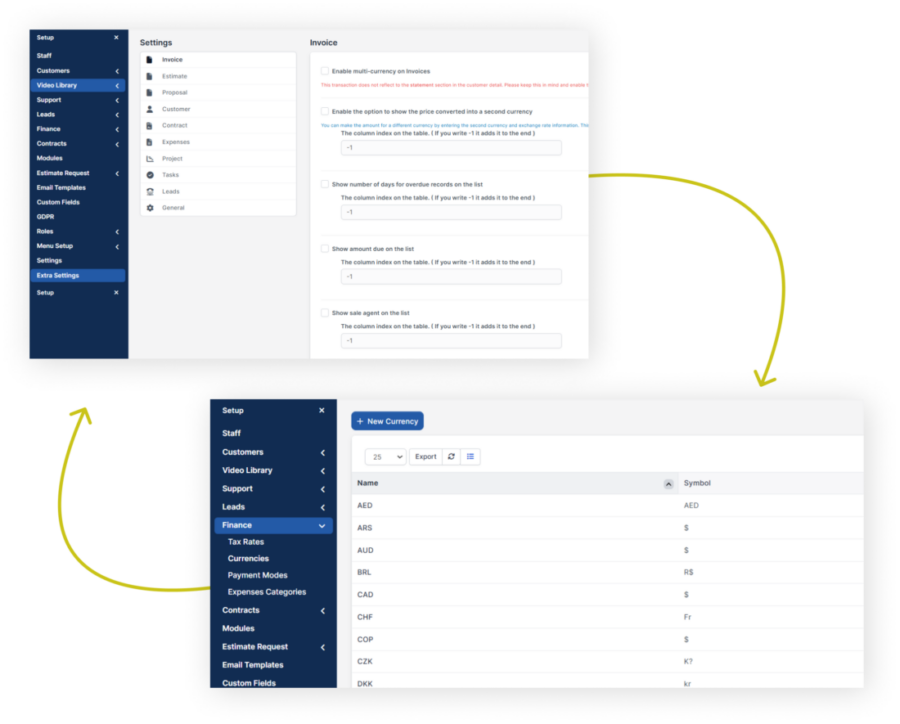
Extra Settings in Xodox CRM provide advanced configuration options that allow businesses to customize multiple CRM modules to match their operational needs. These settings cover areas such as contracts, invoices, estimates, customer records, and other core features helping teams tailor the system for better control and usability.
By adjusting these additional settings, organizations can align the CRM more closely with their internal workflows, improve data organization, and enhance overall functionality. Xodox CRM’s extra configuration options ensure the platform adapts to your processes, not the other way around supporting efficiency, accuracy, and scalability.

Key Features of Extra Settings
- Customer Signature Merge Field: Activate this feature to use customer signatures in multiple areas of a contract.
- Multi-Currency Contracts: Create contracts in different currencies to cater to global clients.
- Sorting Features: Set default sorting preferences for contract lists by specific columns.
- Multi-Currency Estimates: Provide estimates in different currencies for international customers.
- Secondary Currency Tracking: Add exchange rates to manage estimates in foreign currencies.
- Sales Agent Follow-Up: Track sales agents linked to specific estimates.
- Custom Sorting: Enable sorting features to organize estimates by preferred columns.
- Multi-Currency Proposals: Offer proposals in different currencies to cater to international clients.
- Secondary Currency Support: Add exchange rates to manage proposals in foreign currencies.
- Assigned Staff Tracking: Track staff linked to specific proposals.
- Sorting Options: Customize sorting preferences for proposal lists.
- Multi-Currency Invoices: Invoice customers in different currencies by activating this feature.
- Secondary Currency and Exchange Rates: Add secondary currencies to track invoices in foreign currencies.
- Overdue Days Tracking: View the number of overdue days directly on the invoice list.
- Remaining Balance Display: Monitor partial payments and track the amount to be paid.
- Sales Agent Tracking: Follow sales agents associated with invoices.
- Sorting Options: Customize the sorting order of invoice lists for easier tracking.
- Customer Admin Display: Show customer admins directly in the customer list for better tracking.
- Status Change Date: Monitor when a customer's status was last updated.
- Last Invoice Date: Track the last invoice issued to a customer.
- Mobile Login Without Username: Allow customers to log in using their mobile numbers for convenience.
- Lead Source Integration: Use lead sources to enhance customer tracking.
- Sorting Options: Organize customer lists by setting default sorting preferences.
How Extra Settings Work in Xodox CRM
Activate Features
Enable and control advanced CRM capabilities from a centralized settings dashboard. Turn features on or off based on your operational needs, allowing your team to customize workflows without technical complexity.
Organize Modules
Configure how CRM modules behave across your system. Adjust module structure, enable multi-currency support, and define tracking rules to ensure your sales, support, and account workflows align with your business model.
Monitor Results
Track how configuration changes impact productivity and performance using built-in CRM analytics and reporting tools. Gain visibility into usage patterns, efficiency improvements, and workflow effectiveness in real time.
Refine Over Time
Continuously optimize your CRM setup as your business evolves. Update rules, permissions, and automation settings to support new teams, markets, or processes—without disrupting daily operations.
Why Choose Xodox CRM for Extra Settings?
-
Streamlined OperationsSimplify workflows with tailored settings.
-
Enhanced TrackingMonitor critical data points like statuses, overdue invoices, and more.
-
Global CompatibilityUse multi-currency features to manage international business.
-
Customizable SortingOrganize lists and modules for improved efficiency.
-
User-Friendly DesignAdjust settings effortlessly with an intuitive interface.




Benefits of Extra Settings with Xodox CRM
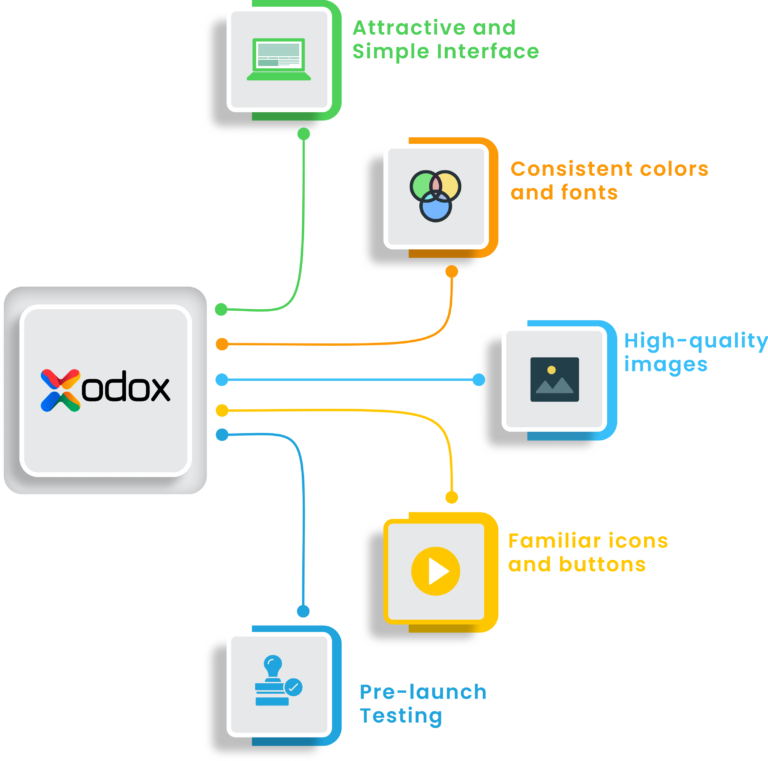
Reduce manual effort with intelligent automation for tracking, sorting, and configuration. Xodox CRM’s advanced settings streamline repetitive tasks, helping teams work faster with fewer errors.
Get a unified view of key data such as contracts, invoices, and customer activity from a single dashboard. Enhanced visibility enables faster decisions and better control across departments.
Customize CRM modules, layouts, and preferences to match how your teams actually work. These flexible settings improve user adoption and reduce friction in daily CRM usage.
Support international growth with built-in multi-currency and localization settings. Xodox CRM makes it easy to manage global clients while maintaining consistency across regions.
Unlock the full potential of your CRM without heavy development or setup costs. Advanced configuration options allow you to scale features and workflows as your business grows without rebuilding systems.
Success Stories from Happy Customers

Sarah J.
Alex R.

Priya S.
Emily T.
Liam T.
Simple Pricing, Powerful and Unlimited Features
Need help with our plans?
Frequently Asked Questions
Xodox Extra Settings provide additional customization and configuration options to tailor the CRM and ERP system according to your business needs.
You can adjust notification preferences, module access, data views, automation triggers, and other personalized features.
Yes. Administrators can control user access levels, define permissions, and secure sensitive data.
No. These settings optimize usability and workflow without compromising speed or efficiency.
Not at all. The settings interface is intuitive, designed for both technical and non-technical users.
30-Day Guarantee
Risk-free with a 30-day money-back promise.
Intuitive Design
Easy to adopt, faster to master.
24/7 Support
Always here, anytime you need us.
Get Your CRM Today
Customize Your CRM for Maximum Impact!
Streamline your operations with Xodox CRM’s Extra Settings.
Let me know when you’re ready to share the Ultra-Shield Security content! 🚀
